How to Contact Google Business Profile (Google My Business) Support
Share on:


The best way to reach Google Business Profile support (formerly Google My Business) is through the Help Center. Search your issue there first. If the guides don't fix it, use Google's support form, which you can also reach from the Support option in your profile. There's no public 24/7 phone line for Business Profile help.
Below is each way to get help, and which one to use for common problems.

1. Start with the Google Business Profile Help Center
The Google Business Profile Help Center has step-by-step guides for most problems: verification, editing your hours, suspended profiles, reviews and posts. Type your question in the search bar the same way you'd search Google.
Many issues have their own form inside the Help Center, like requesting access to a profile someone else owns or asking to reinstate a suspended profile. Using the right form gets your request to the right team.
2. Use the support form
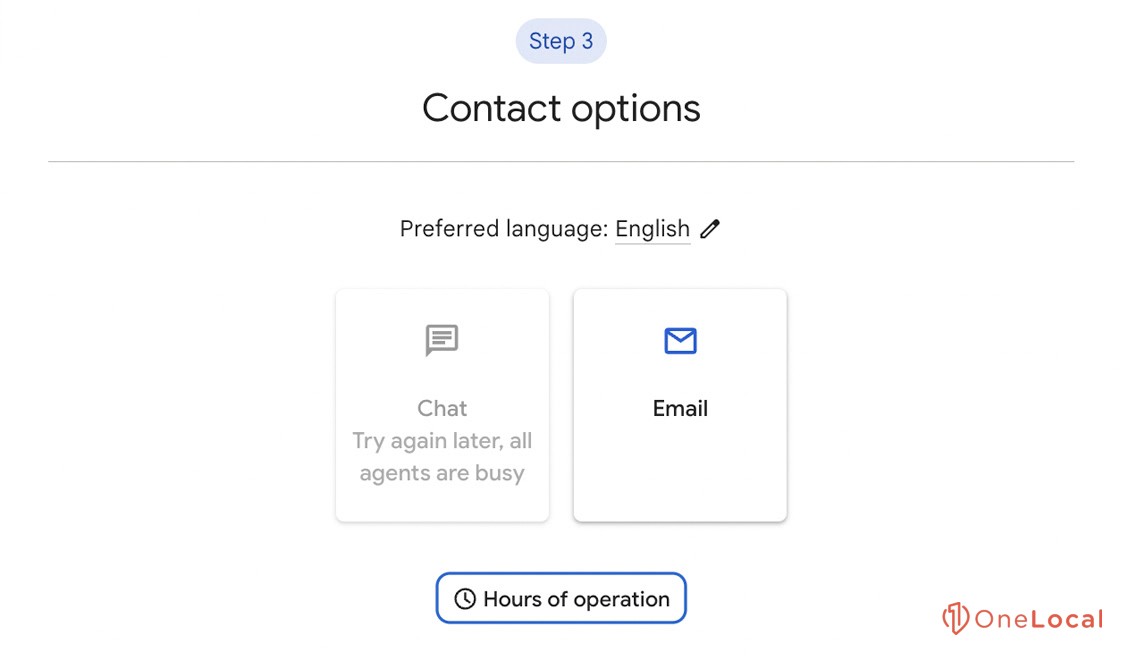
If the guides don't solve it, Google's support form walks you through your issue and then shows the contact options available for it. You can also get there by signing in to your profile and choosing Support.
The options you see depend on your issue. For many problems it's email. Before you send anything, have these ready:
Your business name and address exactly as they appear on Google
The email address that manages the profile
A short description of the problem and when it started
Screenshots of any error messages
3. Ask the Google Business Profile Community
The Help Community is a forum where experienced volunteers (Product Experts) answer questions. It's a good option when your problem is unusual or you're not sure which form to use.
Can you call Google Business Profile support?
Not directly. Google doesn't list a public phone number for Business Profile support, and BrightLocal reports that phone help was retired in 2021 (source). Google Ads has its own support team, but it can't fix Business Profile issues.
Watch out for fake support numbers. Searching for a "24/7 Google My Business phone number" turns up pages that aren't run by Google. Only use contact options you reach from support.google.com or your own profile, and never pay someone claiming to be Google to verify or fix your listing.
Can you contact Google support on social media?
Google has Business Profile accounts on X and Facebook, but replies are rare and they can't access your account. Use them for general questions at most. For anything about your own profile, use the Help Center or support form.
Which option should you use?
Profile suspended: follow the reinstatement steps in the Help Center.
Someone else owns your profile: use the request access form in the Help Center.
Fake or rude review: report it from your profile, then track it in Google's Reviews Management Tool. See our guide on handling Google reviews.
Wrong info showing on Google: edit your profile first. If it keeps changing back, use the support form.
Verification problems: check the verification guides, then use the support form.
Google Business Profile support FAQ
Is Google My Business the same as Google Business Profile?
Yes. Google renamed Google My Business to Google Business Profile. Help for both is in the same Help Center.
Is Google Business Profile support free?
Yes. Google doesn't charge for Business Profile support. Be wary of anyone asking for payment while claiming to be Google.
How long does Google take to reply?
It varies by issue. Review reports, for example, typically take several days, according to Google.
Want your Google profile in better shape?
Fixing your Google profile is worth the hassle. Even referrals look you up before they call, and a thin or outdated profile can send them elsewhere. Get a free audit to see what yours is missing.

Related Article
Related Article